
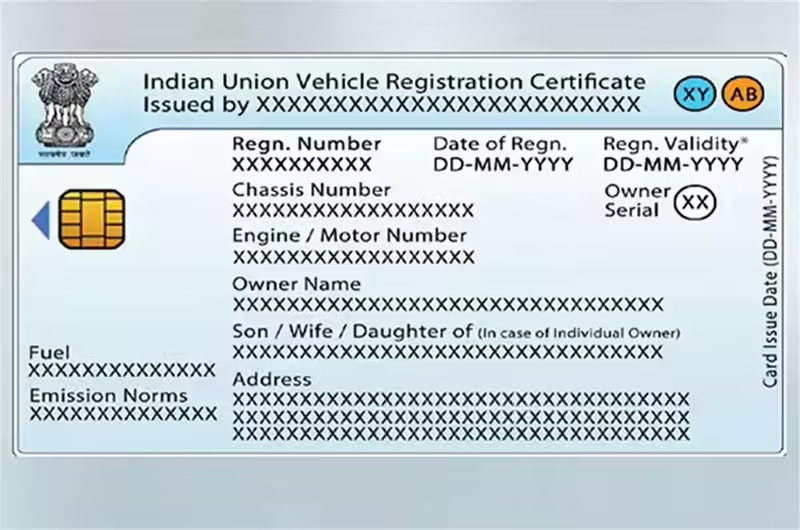
For vehicle owners in Kerala, carrying documents like the Registration Certificate (RC) is mandatory. Earlier, this meant keeping a physical RC book or card in the vehicle at all times. Today, the Government of India allows citizens to use a Digital RC, which can be downloaded and stored securely on official platforms.
Downloading RC online is useful because it saves time, avoids visits to the RTO, and ensures that your vehicle document is always available on your phone. This article explains, step by step, how Kerala residents can download their Digital RC using official government platforms.
What is Digital RC (Vehicle Registration Certificate)?
A Digital RC is the electronic version of your vehicle’s Registration Certificate, issued by the transport authorities.
Key points:
- It contains the same details as the physical RC
- Issued through official government systems
- Available in digital format (PDF or app-based view)
Digital RC vs Physical RC
- Physical RC: Paper book or smart card
- Digital RC: Electronic document accessible on mobile or web
Both represent the same registration record in government databases.
Is Digital RC Valid in Kerala?
Yes. Digital RC is legally valid in Kerala and across India.
- Approved by the Government of India
- Accepted by traffic police during vehicle checks
- Valid under the Motor Vehicles Act
Traffic authorities accept Digital RC shown via official apps and websites.
Details Required to Download RC Online
Before starting, keep the following details ready:
- Vehicle Registration Number (e.g., KL-07-XXXX)
- Chassis Number or Engine Number (for verification, if asked)
- Registered mobile number (to receive OTP)
These details help verify ownership and fetch the correct RC.
How to Download RC Online from the Parivahan Website

Parivahan Sewa – Digital RC Download
The Parivahan portal is the official transport services website of the Government of India.
Step-by-step process:
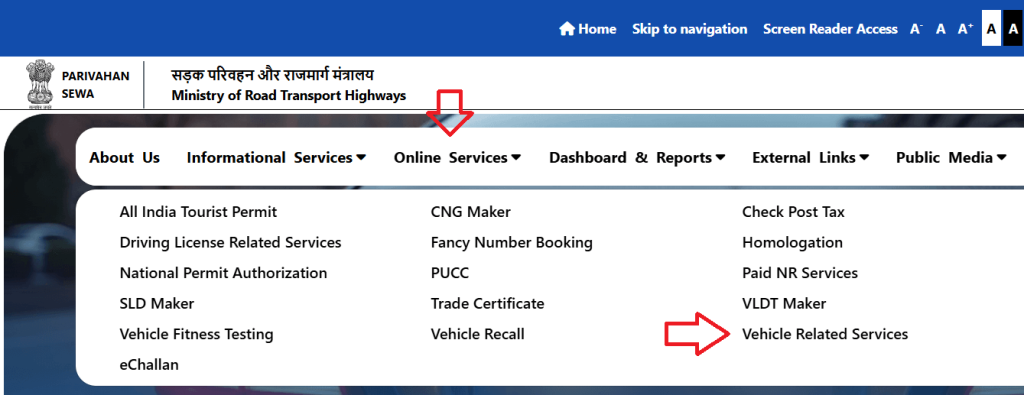
- Open the official Parivahan website in your browser
- Go to Vehicle Related Services
- Select the option related to RC services
- Enter your vehicle registration number
- Verify details using OTP sent to your registered mobile
- View and download the Digital RC (if PDF option is available)
This method is useful for checking vehicle records directly from the transport database.
How to Download RC Using DigiLocker (Recommended Method)
DigiLocker is a government digital wallet that stores verified documents.
Why DigiLocker is recommended:
- Officially linked with transport databases
- RC is fetched automatically
- Accessible anytime after linking
Steps to get RC in DigiLocker:
DigiLocker – Vehicle RC
DigiLocker App – Vehicle RC (Android)
DigiLocker App – Vehicle RC (iOS)
- Open DigiLocker website or app
- Log in using mobile number or Aadhaar
- Go to Issued Documents or Fetch from Issuer
- Select Transport Department / Parivahan
- Enter your vehicle registration number
- Your Digital RC will be added automatically
Once added, the RC remains available permanently unless removed.
How to Get RC in mParivahan App
mParivahan App – Digital RC (Android)
mParivahan App – Digital RC (iOS)
The mParivahan app is designed for vehicle owners to access transport documents on mobile.
How it works:
- Install and open the mParivahan app
- Register using your mobile number
- Add your vehicle by entering the registration number
- Verify details through OTP
- Access Digital RC within the app
The RC can be viewed even offline after initial loading.
Advantages of Digital RC Download
Using a Digital RC offers several benefits:
- No need to carry physical RC
- Easy access on mobile phone
- Safe from loss, damage, or fading
- Accepted during traffic checks
- Useful while travelling across states
It simplifies compliance with traffic rules.
Common Issues While Downloading RC & Solutions

Vehicle details not found
→ Check registration number format and try again.
OTP not received
→ Ensure mobile number is linked with vehicle records.
RC not showing in DigiLocker
→ Use “Fetch from Issuer” option or try again later.
Old vehicle records missing
→ Visit RTO once to update records if needed.
Important Points to Remember
- Digital RC is legally valid in Kerala
- Always use official government platforms only
- Keep your mobile number updated in vehicle records
- Do not rely on third-party or unofficial apps
Conclusion
Vehicle owners in Kerala can easily download and use Digital RC online without visiting RTO offices. By using official platforms like the Parivahan website, DigiLocker, and the mParivahan app, you can keep your Registration Certificate safe, accessible, and legally valid at all times.
Digital RC makes vehicle document management simpler, faster, and more secure for everyday use.